
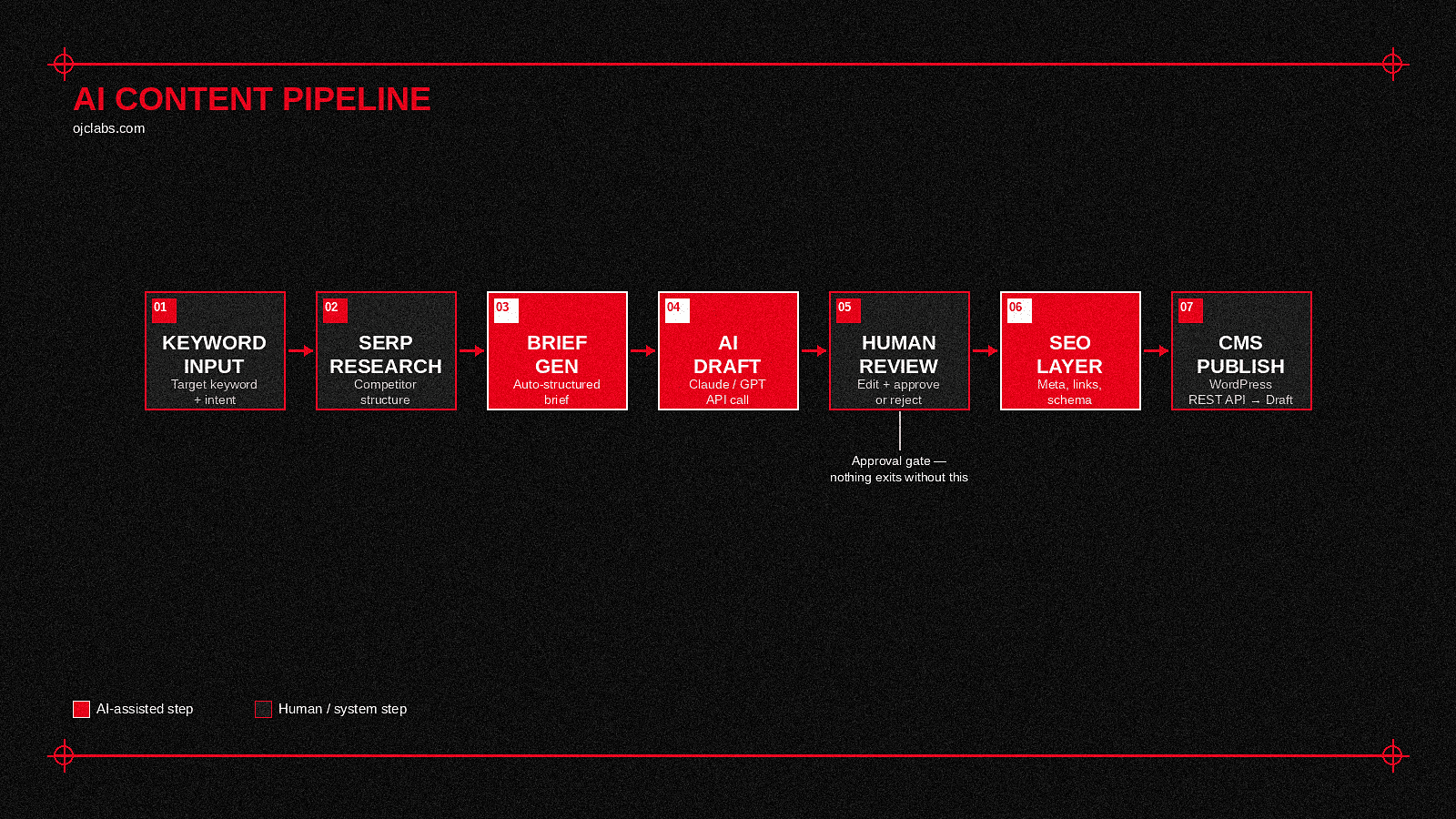
A content operation without a pipeline isn’t a pipeline. It’s a series of buckets — a brief sitting in one, a draft sitting in another, an SEO check happening in a third, a publish step that requires three Slack messages and someone’s manual approval before anything moves. Each bucket does its job. None of them talk to each other. And the people carrying content between them are doing work that, if anyone sat down and honestly timed it, would turn out to be the majority of what the team actually spends its week on.
An AI content pipeline connects the buckets. Brief goes in one end, reviewed, structured, SEO-ready content comes out the other, with AI handling the repetitive middle and humans handling the parts that actually require judgment. This is how you build one.
What an AI Content Pipeline Actually Is
Before the build, a definition worth being precise about: an AI content pipeline is the infrastructure connecting research, drafting, optimization, and publishing into one continuous automated flow — not a single AI writing tool you open when you need a draft, but a system that moves content through stages without someone manually handing it from one tool to the next.
The distinction matters because most teams already have the tools. What they’re missing is the connective tissue between them. A keyword research spreadsheet, a brief template, a Claude tab, a WordPress login, and a Google Analytics dashboard aren’t a pipeline — they’re five separate tools a human is currently bridging by hand. The pipeline automates the bridges, not the tools themselves.
For the conceptual foundation underneath this, What Is a Content Automation System covers the architecture in detail. This guide is the build.
Step 1: Define the Content Unit and Its Stages

A pipeline needs a unit — the specific thing moving through it — and a defined set of stages that unit passes through. For most SEO-focused content operations, the unit is a blog post, and the stages look something like this:
- Keyword and intent input
- SERP research and competitor structure analysis
- Brief generation
- AI first draft
- Human editorial review
- SEO metadata generation (title, meta description, internal link suggestions)
- Formatting for CMS
- Publish and distribution
Map these stages before touching any tooling. The stages define what the pipeline needs to do, and the tooling serves the stages — not the other way around.
Step 2: Choose Your Orchestration Layer

The orchestration layer is what moves the content unit between stages automatically. n8n handles this well — it connects HTTP requests, API calls, database reads and writes, and conditional logic in one visual workflow without bespoke backend code for every handoff. The same orchestration logic that powers a lead-scoring automation, as covered in How to Build an AI Automation System, applies directly here, with content as the data moving through the pipeline instead of CRM records.
One decision to make early: does the pipeline trigger on demand (someone kicks it off per post) or on schedule (it runs every Tuesday morning against a content calendar)? Both are valid, and both have different implications for how you structure the input stage and how much the pipeline needs to manage its own queue.
Step 3: Build the Research Stage

A draft written without knowing what’s currently ranking for the target keyword is a draft written blind. The research stage fetches the structure of competing top-performing pages before any drafting begins, giving the AI model actual signal rather than making things up from training data alone.
In practice this means: an API call to a SERP data provider (SERPApi, DataForSEO, or equivalent) for the target keyword, pulling the top ten results, extracting their heading structures and approximate content length, and passing that as structured context to the drafting stage. The model doesn’t copy the competitors — it uses their structure as evidence of what Google currently considers the right shape for this topic.
Step 4: Generate the Brief Automatically

The brief is the instruction set for the draft. Generated automatically from the keyword, the SERP research, and whatever brand/voice guidelines you’ve stored in the system, it should specify: target keyword and secondary keywords, recommended heading structure based on competitor analysis, content angle (informational, transactional, comparison), target length, internal links to include, external sources to reference, and the CTA.
This is the stage most content pipelines skip, going straight from keyword to draft. Skipping it means the AI model is making editorial decisions the brief should have already made, which produces inconsistent output and more editorial review time downstream, not less.
Step 5: Draft With the AI Layer

With a structured brief and SERP research as context, the drafting call to the OpenAI API or Claude API is straightforward: system prompt defining voice and output format, user message containing the brief and research context, response in structured sections matching the brief’s heading outline.
Three things that make the draft actually useful rather than generically competent:
- Pass the voice guide as part of the system prompt. Not “write in a professional tone” — the actual documented voice, specific vocabulary, sentence structure preferences, things to avoid. The more specific the voice guide, the less editorial work the draft requires.
- Ask for section-by-section output, not one block. A structured JSON response with each heading and its content as separate fields is easier to review, edit, and route through subsequent stages than one long text block.
- Include a confidence flag per section. Ask the model to flag any section where it’s reasoning from general knowledge rather than the provided research. Those sections get human attention first during review.
Step 6: Human Editorial Review

The review stage is not optional, and it’s not a formality — it’s the stage that decides whether the pipeline produces content worth publishing or content that looks like content. The AI draft goes to a human with the brief alongside it, so the reviewer is checking against the brief rather than editing in a vacuum.
What the reviewer is actually checking: factual accuracy (especially on the confidence-flagged sections), voice fidelity, whether the fine-print detail that makes a post genuinely useful is present or whether the draft settled for the obvious points, and whether the internal links actually read naturally rather than feeling bolted on.
Build the review interface into the pipeline, not outside it. A Slack message with the draft and an approve/edit/reject button is enough. What matters is that the output of the review stage feeds back into the pipeline automatically rather than requiring someone to copy-paste an approved draft into a different tool.
Step 7: SEO Layer — Metadata and Internal Linking

Once the draft is approved, a second AI pass generates the technical SEO layer: meta title, meta description, focus keyword placement check, suggested internal links from existing published content, and schema markup if the content type warrants it. This is a separate call from the drafting call because it’s a different task with a different output format, and mixing them produces worse results on both.
The internal linking step specifically benefits from having your full published content index available as context — a vector search or even a simple keyword-match against your existing post slugs lets the model suggest links that actually exist rather than inventing URLs that sound plausible.
Step 8: Format for CMS and Publish

The final stage converts the approved, SEO-layered content into whatever format your CMS expects and pushes it via API. For a headless WordPress setup this means a REST API call with the post body as HTML, the meta fields populated, the featured image attached, and the status set to draft (not published directly — one more human confirmation before anything goes live).
Draft, not publish, is the right default for the pipeline’s output. The pipeline does the production work. A human presses publish. That distinction is what keeps the system trustworthy rather than just fast.
When these stages share one content model, one approval state and one monitored publishing path, the pipeline becomes an AI-assisted content operating system rather than a folder full of prompts that happens to produce articles.
What the Tutorials Conveniently Leave Out
- The voice guide is load-bearing infrastructure, not a nice-to-have. A pipeline without a precise, documented voice guide produces drafts that are technically correct and editorially generic, which means every piece needs heavy rewriting before it sounds like you. The voice guide is worth investing in before building the pipeline, not after, because it determines how much editorial time the pipeline actually saves.
- SERP data expires. Competitive content structure that was accurate when you ran the research may not reflect the current top results by the time the post publishes, especially on fast-moving topics. Build a freshness check into the research stage — if the SERP data is more than a few days old, re-fetch before drafting rather than trusting a stale snapshot.
- Keyword cannibalization is the pipeline’s most common silent failure mode. A system that generates posts from a keyword list without checking existing published content will eventually produce a post that directly competes with one you already have ranking. Build a pre-draft check that queries your existing content index for semantic overlap before the pipeline reaches the drafting stage.
- Distribution is a stage, not an afterthought. A pipeline that ends at “publish to WordPress” is missing half the content operation. LinkedIn caption, email newsletter excerpt, internal notification — these are pipeline stages, not manual tasks someone does after the post goes live. Wire them in while building, not after.
- Refresh logic matters as much as creation logic. Content decays. A pipeline with no scheduled refresh pass is building a backlog of outdating posts from day one. Plan the refresh cadence at build time — which posts get re-run through the pipeline every six months, which get flagged for manual review, which get left alone.
Where This Fits
An AI content pipeline removes the manual bridges between tools your team is already using, letting the people on it spend time on the editorial judgment the system can’t replace rather than the repetitive production work it absolutely can. The underlying automation architecture is the same one described in What Is an AI Automation System for Businesses — content is just the specific domain it’s applied to.
If you want to see what this looks like in production rather than in theory, explore OJC Labs.